- Details
- Category: Blog
Hola Astroid's fans,
This time I'm so happy to announce a new version of Astroid framework which comes with new features, improvements, and bug fixes. Let's take a brief look at the changelog of Astroid 3.0.12 to see details of the update.
Astroid Framework 3.0.12 Changelog:
Added
- Add feature Enable/Disable widgets
- Add Menu Assignment feature
Improved
- Update quill v2.0.0
- Improve UI/UX Select Element box
- Update language for Off Canvas button position
- Add rel attributes for Navigation Link
- Improve display multiple megamenu on website
- Add feature enable/disable link title - Navigation Widget
- Add Link Target to the image widget
- Update space between leading Items
- Update article detail style
- Update sub-categories position
- Update Box style
Fixed bugs
- Fix issue Mobile logo not centered on Horizontal mode
- Fix issue Manifest Link does not work
- Fix issue buttons does not show on Grid widget
- Fix issue duplicate trigger beforeDisplayContent
- Fix issue duplicate title and meta tag on Error page
- Fix issue with Box layout
- Fix issue does not load Image background in Error page
Enable/Disable widgets
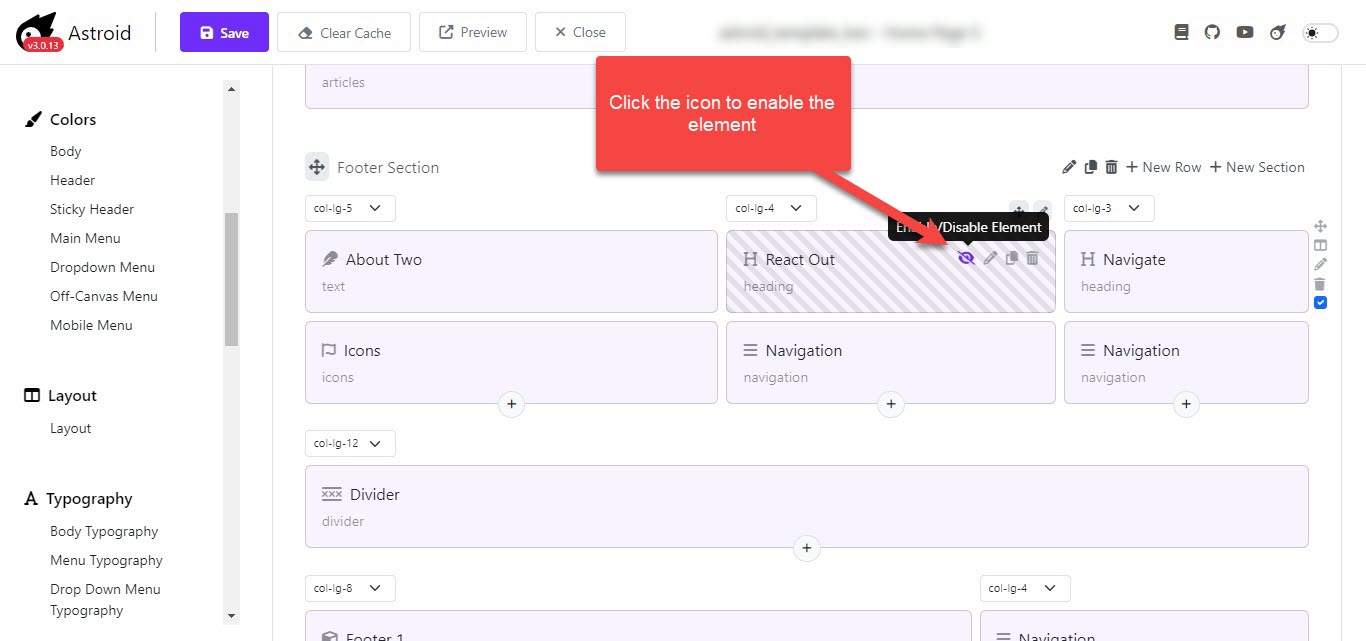
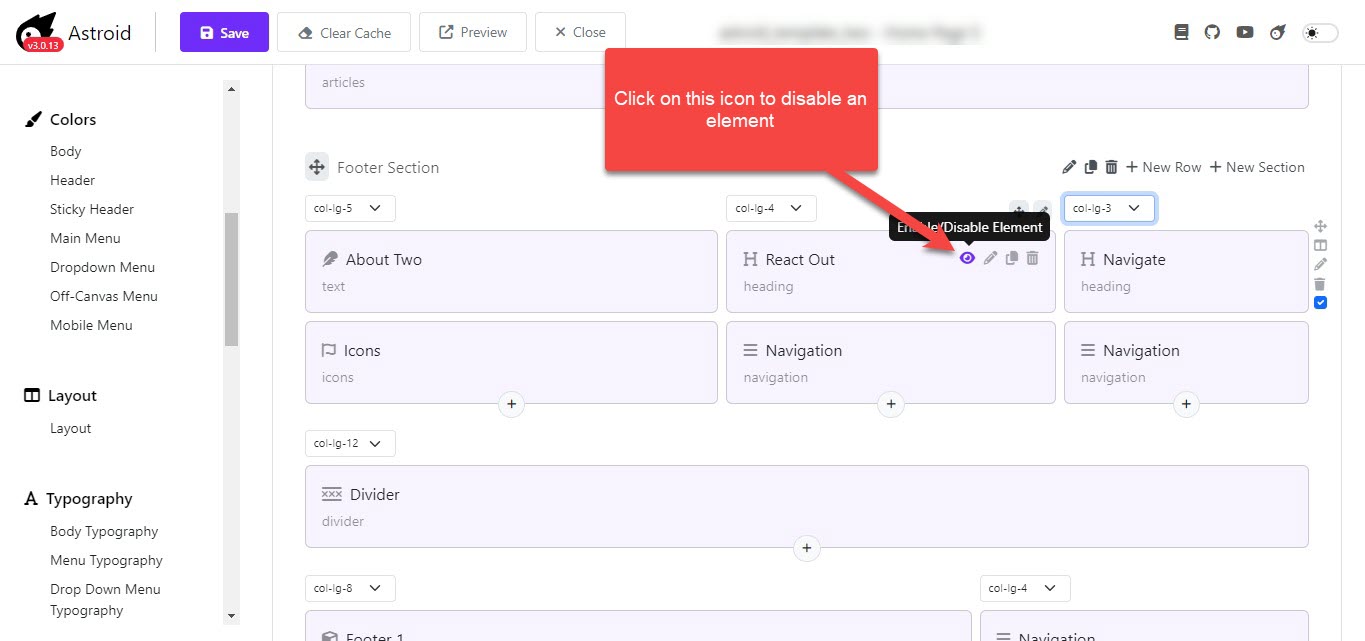
Apart from adding rows, columns, nested columns, and inserting widgets into a layout, you're now capable of turning off or turning on the widget element in a blink of an eye. The disabled element will still exist on the backend, but users will not see them on the live site.
You can see the eye icon when hovering on an element, and you should click on it to enable or disable the element.
Widget's Menu Assignment feature
 Widget Assignment
Since Astroid version 3.0.12, you can assign a widget to specific pages, which is quite similar to the module's menu assignment of Joomla. By editing a widget in a layout, you can find it in the widget Assignment tab of the element. You can choose between all pages, No pages, or Only on the pages selected. If you choose to display the widget on the page selected, a list of menu items will appear for you to choose one by one.
 Assign the widget to specific menu items.
- On all pages: the widget will be visible on all pages of your website
- No pages: the widget will be invisible on all pages
- Only on the pages selected: the widget is only shown on selected menu items
Why are you hesitant to implement the update? Let's start to upgrade Astroid 3.0.12 today to take advantage of the latest goodies. Don't forget to share with us your feedback and contact us if there are any problems.
You can update the component using the single-click updater in Joomla or download the latest package on Github, then install it manually. If you have any problem with the update, don't hesitate to contact us or post your issues HERE.
Download It On GitHub! Learn More Astroid Templates

- Details
- Category: Blog
Hola Astroid's fans,
While you're playing with Astroid 3.0.9, today we are back with another update. This update comes with new widgets, improvements, updates and bug fixes. You will find 2 more widgets added to the widget library including the Slideshow widget, and the Image group widget.
There is a substantial number of updates and enhancements added to this update batch, which will improve your experience with the framework. This version allows you to disable an element in the layout builder in case you would like to turn it off temporarily and possibly turn it on later.
Besides improvements and new features, this version also brings a bunch of bug fixes that were encountered in the previous version.
Why are you hesitant to implement the update? Let's start to upgrade Astroid 3.0.10 today to take advantage of the latest goodies. Don't forget to share with us your feedback and contact us if there are any problems.
Let's take a brief look at the changelog of Astroid 3.0.10 to see details of the update.
Astroid Framework 3.0.10 Changelog:
Added
- Add Slideshow Widget
- Add Divider field
- Add Image Group widget
- Add Override feature for system files
Update
- Update Separate header style
- Update Overlay style for Article Widget
- Update Article Overlay Type
- Update Grid Border Radius Size
- Update Text widget feature display in columns
Improve
- Re-style Divided Header
- Improve text color mode for Article and Image Group
- Improve Offline style
- Show a warning if admin save the widget without saving the subform content #552
- Add feature Enable/Disable element on Layout Builder
- Add framework version to media in back-end view
Fixed bugs
- Fix the issue Links are not crawlable
- Fix issue SEO Google Lighthouse
- Fix issue if social profiler is empty
- Fix Menu item type “Separator” does not work on Mobile
- Fix issue duplicated description in Astroid Heading field
- Fix issue Article width overflow
- Fix issue add new element is disabled
Why are you hesitant to implement the update? Let's start to upgrade Astroid 3.0.10 today to take advantage of the latest goodies. Don't forget to share with us your feedback and contact us if there are any problems.
You can update the component using the single-click updater in Joomla or download the latest package on Github, then install it manually. If you have any problem with the update, don't hesitate to contact us or post your issues HERE.
Download It On GitHub! Learn More Astroid Templates

- Details
- Category: Blog
Dear Astroid's fans,
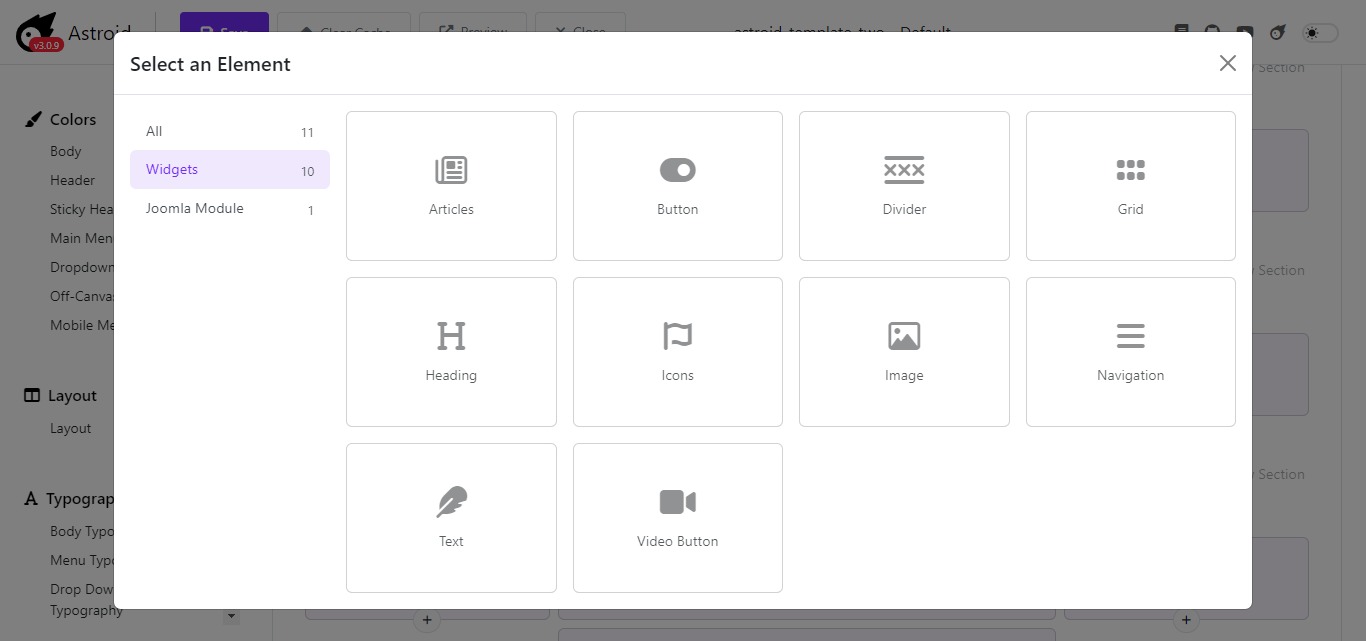
Astroid framework 3.0.9 has already been available. This update comes with tons of goodies including new widgets, bug fixes, and improvements. You will find 3 more new widgets packed in the package, such as Grid widget, Video button widget, and Articles widget. Several well-known issues were also addressed to ensure the best performance on Joomla.
New Astroid Widgets:
- Grid widget: It allows you to display any data set in a grid view.
- Video button widget: This is an ideal solution for you if you’re seeking a quick and easy way to display your Vimeo and YouTube videos on your Joomla site.
- Articles widget: This can be used to display a variety of Joomla articles such as announcements, news, events, and more.
Let's take a brief look at the changelog of Astroid 3.0.9 to see details of the update.
Astroid Framework 3.0.9 Changelog:
Added
- Add Astroid Editor field
- Add Grid Widget
- Add Video Button Widget
- Add Categories field & Add Articles Widget
Update
- Add a text-alignment feature for the element style
- Add feature Border Radius, Gutter for Button Widget
- Optimized VUEJS Code
- Update Text Widget - content field
- Update Astroid Radio text
- Update Radio field
- Update Spacing units
- Update MegaMenu style
Fixed bugs
- Fix the Override issue on Windows XAMPP server
- Fix the issue Subform does not update when delete/duplicate item
- Deprecated function in PHP 8.2 $this->params->get('sass_overrides')
- Fix issue wrong regex in checkShow function
- Fixed issue WCAG compatible.
- Fix issue border radius in Grid widget
- Fix issue with Separator menu
- Fixed an issue where the menu was displayed in the wrong position
We highly recommend users always keep the component up-to-date, not only to receive goodies in the new version but to avoid unexpected problems. The update procedure is completely straightforward.
You can update the component using the single-click updater in Joomla or download the latest package on Github, then install it manually. If you have any problem with the update, don't hesitate to contact us or post your issues HERE.
Download It On GitHub! Learn More Astroid Templates

- Details
- Category: Blog
Hola Astroid's fans,
I'm so pleased to announce that Astroid framework 3.0.8 has already been released. There are several brand-new widgets added to the layout builder, and a bunch of updates and bug-fixed also come bundled.
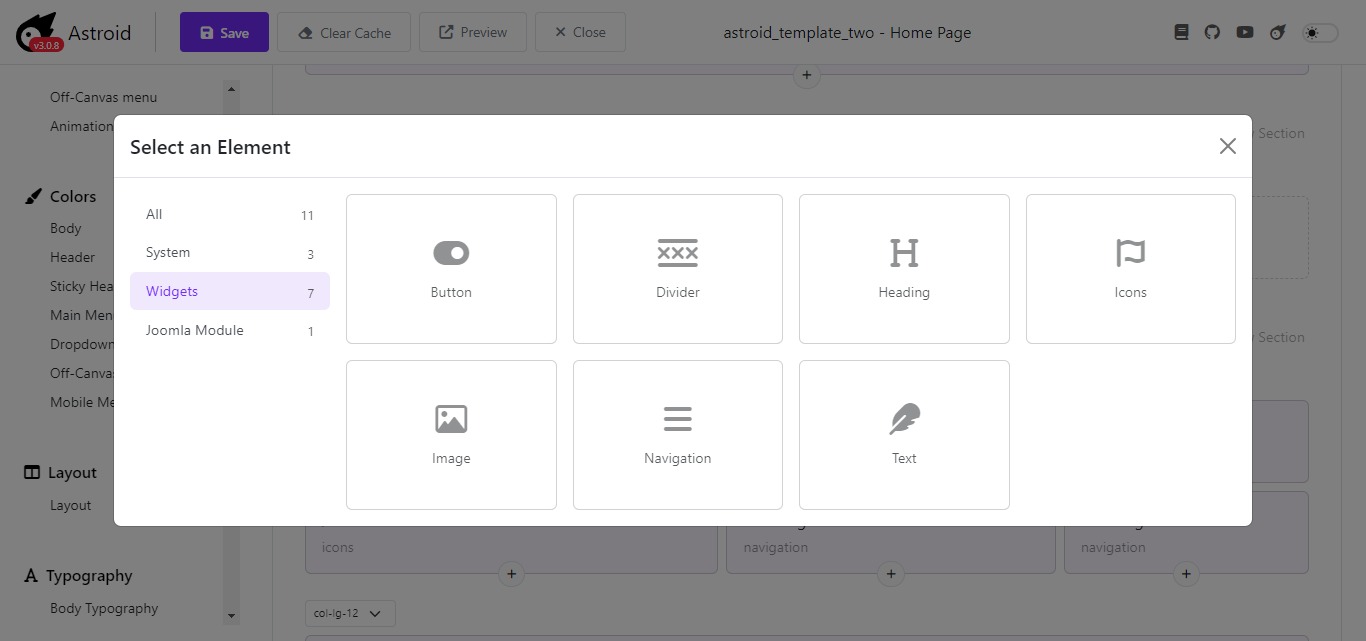
In version 3.0.7, you had a chance to meet 3 first widgets Heading widget, Button widget, and Text widget. This time we have released, Navigation, Image, Button (updated version), and Icon widget added to the library.
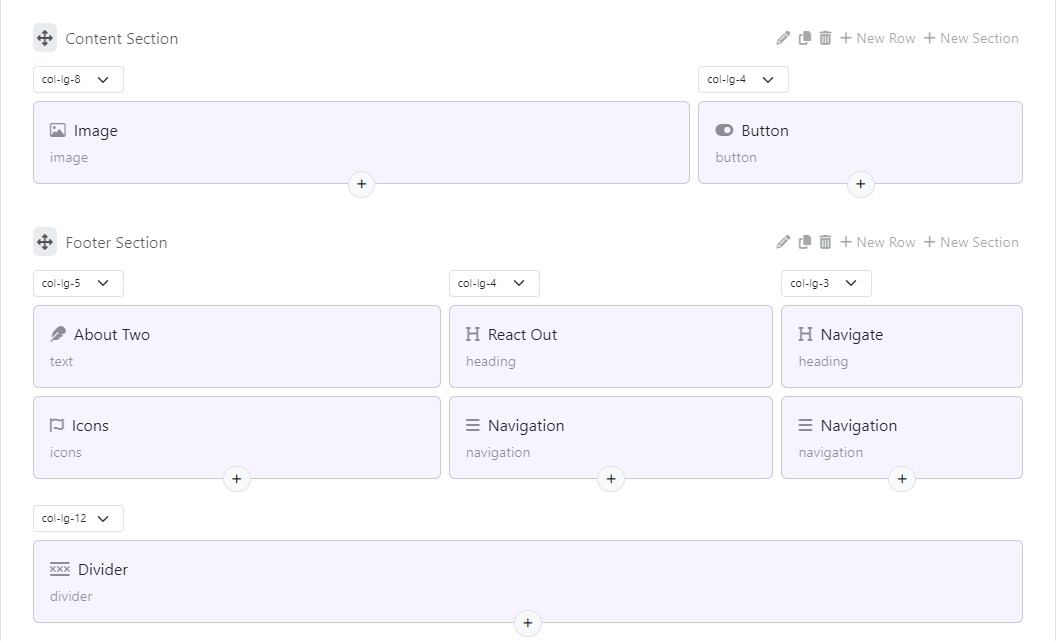
Divider Widget
The Divider widget helps you improve page structure by adding a visual line that separates widgets into distinct groups to create a clear hierarchy. When you add a Divider widget to the page, the default style is a thin black line. You're certainly capable of adjusting the width, style, color, and other design settings of the widget.
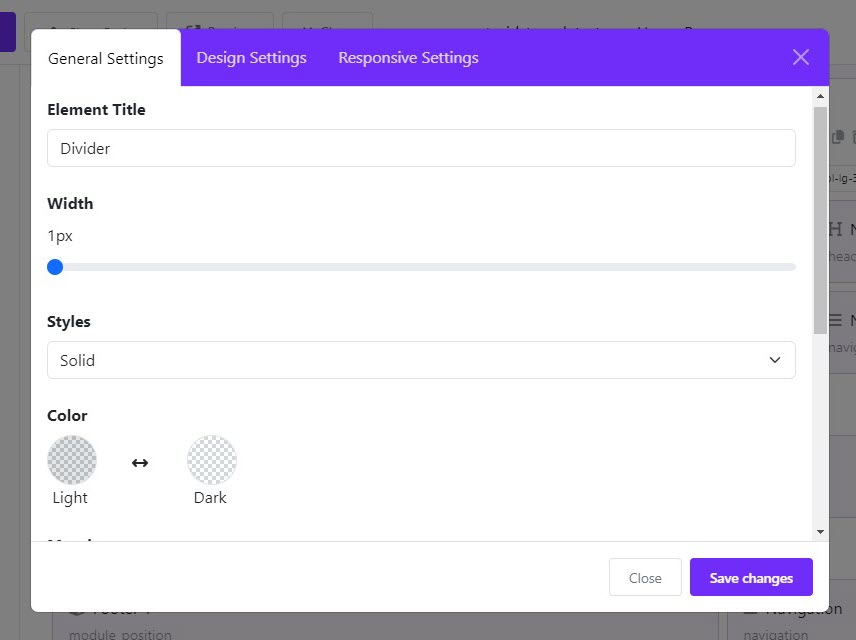
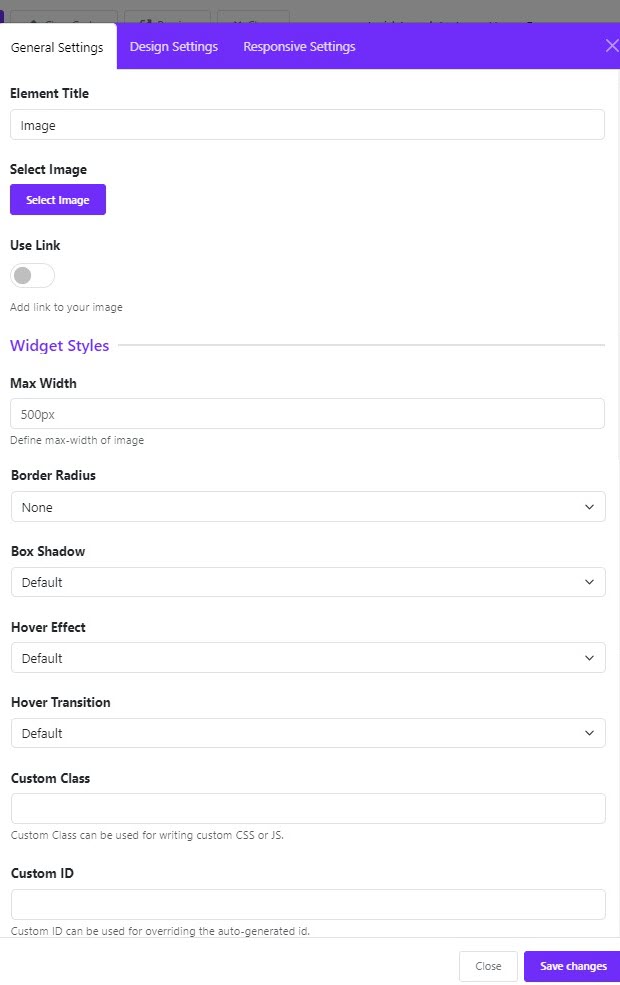
Image Widget
The Image widget allows you to add static and dynamic images to a page. This version also offers you with hover effect and hover transition effect for images.
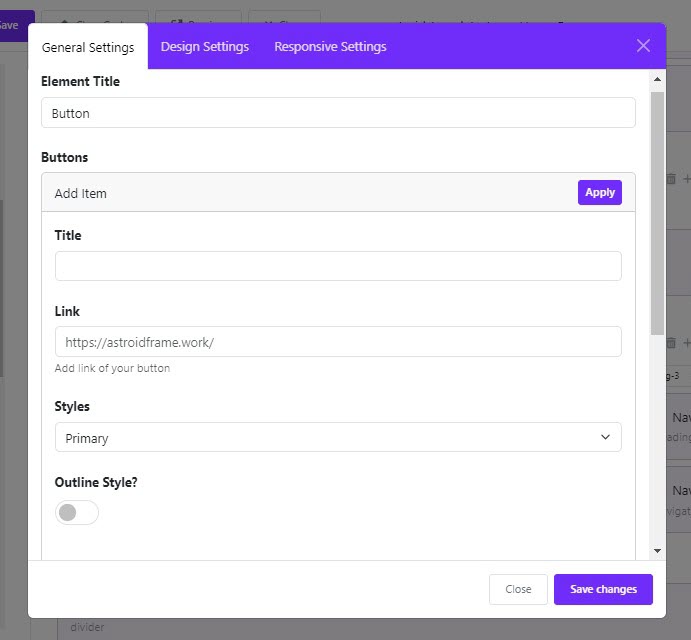
Button Widget
The Button widget provides links to open pages, windows, and section views in your app, scroll to a particular block or the top of the page, or go to a web address. You can choose from different styles, sizes, and colors to design buttons.
Icons Widget
The Icon widget is useful for displaying FontAwesome icons in numerous styles on your page.

Navigation Widget
It’s a widget that allows you to integrate a handy menu bar on your website. Using it, you’ll make it much easier for your users to navigate different areas of your website.
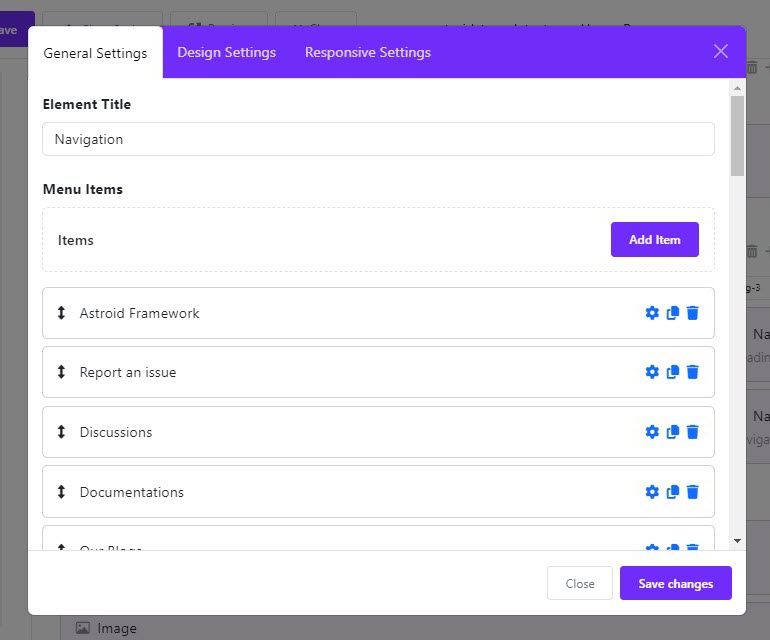
Let's take a brief look at the changelog of Astroid 3.0.8 to see details of the update.
Astroid Framework 3.0.8 Changelog:
Added
- Add Divider widget
- Add Navigation Widget
- Add Image Widget & Hover Transition effect
- Add Icons Widget
- Add Button Widget.
Update
- Update FontAwesome 6.5.1
- Updated Add class "module-title" for module heading
Fixed bugs
- Fix the issue submenu incorrect in the RTL mode
- Fix the issue HTML injection in getBodyClass()
- Correct Astroid Menu Icon field
- Fix the issue image window too small on editing article
- Fix the issue Sticky Header on Mobile doesn't work
- Fix the issue when SVG size not specified
- Fix the issue if SVG tag display in multi-line
We highly recommend users always keep the component up-to-date, not only to receive goodies in the new version but to avoid unexpected problems. The update procedure is completely straightforward.
You can update the component using the single-click updater in Joomla or download the latest package on Github, then install it manually. If you have any problem with the update, don't hesitate to contact us or post your issues HERE.
Download It On GitHub! Learn More Astroid Templates

- Details
- Category: Blog
Hola Astroid's fans,
Today I would like to inform you that Astroid framework 3.0.7 is already available. This version comes with new features, improvements and bug fixes.
Since Astroid 3.0.7, you'll find the framework more powerful than ever thanks to brand-new widgets added, such as Heading widget, Button widget, and Text widget. And of course, many other widgets will be added to the library in the future.
You can add these new widgets directly into the Astroid's layout, they carry the same functions as add-ons of the page builder do. Some of you will find it helpful in case there is no page builder extension.
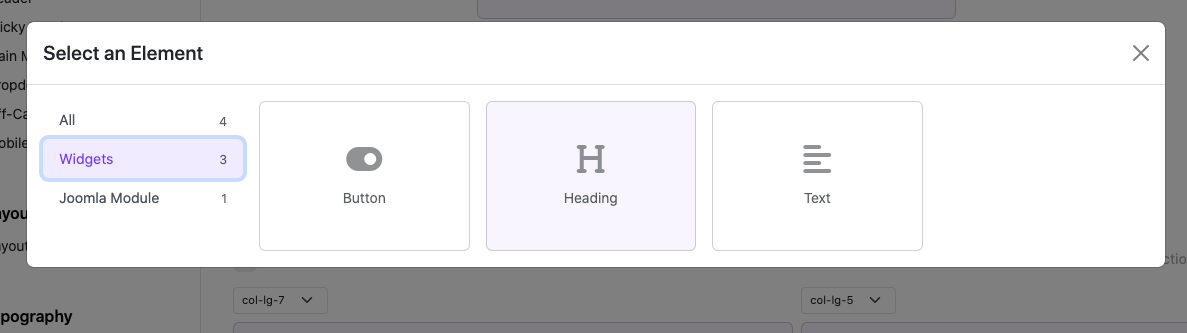
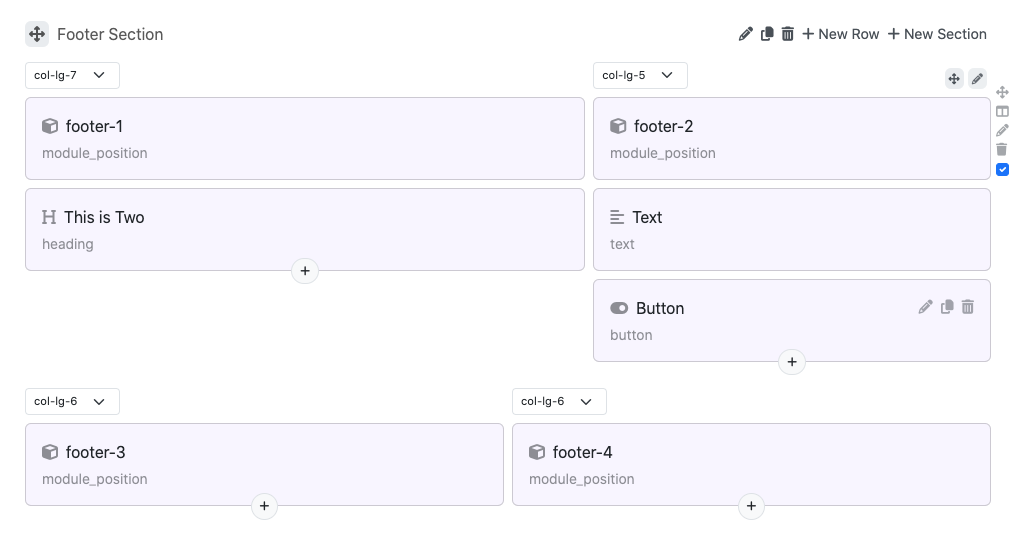
Apart from JPG and PNG image formats, Astroid has already supported SVGs for the logo. SVG images are scalable and ideal for logos that need to be displayed at different sizes, such as on different devices or at different resolutions.
New
- Add Heading Widget
- Add Text Widget
- Add button widget.
- Add social share buttons for Article item
- Add feature support SVG logo
Update
- Re-style layout modal
- Improve typography field function
- Improve MultiSelect field function
- Update style for related article and Author block
- Add icon for layout element
- Update astronaut.png
Fixed bugs
- Fix issue call Override from a template which is not default
- Fix issue can not close Color pallete when turn off Colormode
- Fix issues of Social Icons
We highly recommend users always keep the component up-to-date, not only to receive goodies in the new version but to avoid unexpected problems. The update procedure is completely straightforward. You can update the component using the single-click updater in Joomla or download the latest package on Github, then install it manually. If you have any problem with the update, don't hesitate to contact us or post your issues HERE.
Download It On GitHub! Learn More Astroid Templates

- Details
- Category: Blog
Dear our beloved Astroid fans,
Along with Joomla 5 release, we were well aware of preparing a better version of Astroid framework, so that it'll be completely ready for new features offered by Joomla 5. And today we're happy to announce that Astroid 3.0 is now available to download and you can use it on your live sites. This update brings you tons of improvements, bug fixes, and amazing new features that certainly allow you to improve the website-building process with greater efficiency.
New Features
- Re-build admin template option with VueJS
- New Admin UI Interface
- Add Dark Mode style in Template Options
- Improved PHP 8+ compatibility
Updates
- Joomla 5 compatible
- Bootstrap 5.3.2 update
- Stabilization & Cleanup
- Improved Layout Builder UI/UX
- Improved Typography UI Design
- Improved Color UI Design
- Improved Show/Hide Option
- Improved Spacing Options
- Improved Social Profiler UI Design
- Optimized Speed
- Fontawesome 6.4.2
- Stabilization & Cleanup
- And many more
Fixes
- Fix issue Does Not Work With Widgetkit or Zoo
Removed
- Removed AngularJS Support
Joomla 5 Compatible
Joomla 5 was released and came with plenty of awesome features, security, and enhancements. Importantly, we were well aware that Astroid should embrace the latest advancements and be ready for Joomla 5. Now it's time for you to enjoy both Joomla 5 and Astroid 3.
New Admin UI Interface
You'll find it completely redesigned, and rebuilt to bring major changes in the framework's admin panel. Astroid 3 was reborn for the sake of our beloved customers and your business. We took good care not only for UI but UX also, so that to boost your productivity and save time.
Dark Mode Style In Template Options
From Astroid 2.6.6, the framework supported the color mode that allows you to display the dark vs light skin switcher in the front end. And now the color mode has come with the back-end interface also.
Faster Backend Loading
Let's download and enjoy Astroid 3. Then you'll be surprised with its loading speed, compared to the previous versions. It just takes ms to load the template options panel, which will surely never let you down.
This next generation of Astroid works perfectly with Joomla 4 & Joomla 5 for your information. You can upgrade the framework from version 2.x to 3.x easily. The update procedure is completely straightforward. You can update the framework using the single-click updater in Joomla or download the latest package on Github, then install it manually. If you have any problem with the update, don't hesitate to contact us or post your issues HERE.
Download It On GitHub! Learn More Astroid Templates
- Details
- Category: Blog
Hi guys,
We just released a new version of Astroid Framework, which contains bug fixes, enhancements, and awesome new features. It was a hard-working week for our team to implement these changes to improve user experience and help your website work smoother. Follow me and find out what's included in the latest release.
New Features
- Add Color Mode Feature
Since Astroid version 2.6.5, you have a chance to enjoy this awesome feature of color mode. In particular, besides the default light mode, the framework also offers a dark color mode that helps your visitors read more content, spend more time on your website and protect their eyes from being hurt at night. Enabling the color mode with just a single click in Basic> Page Settings.
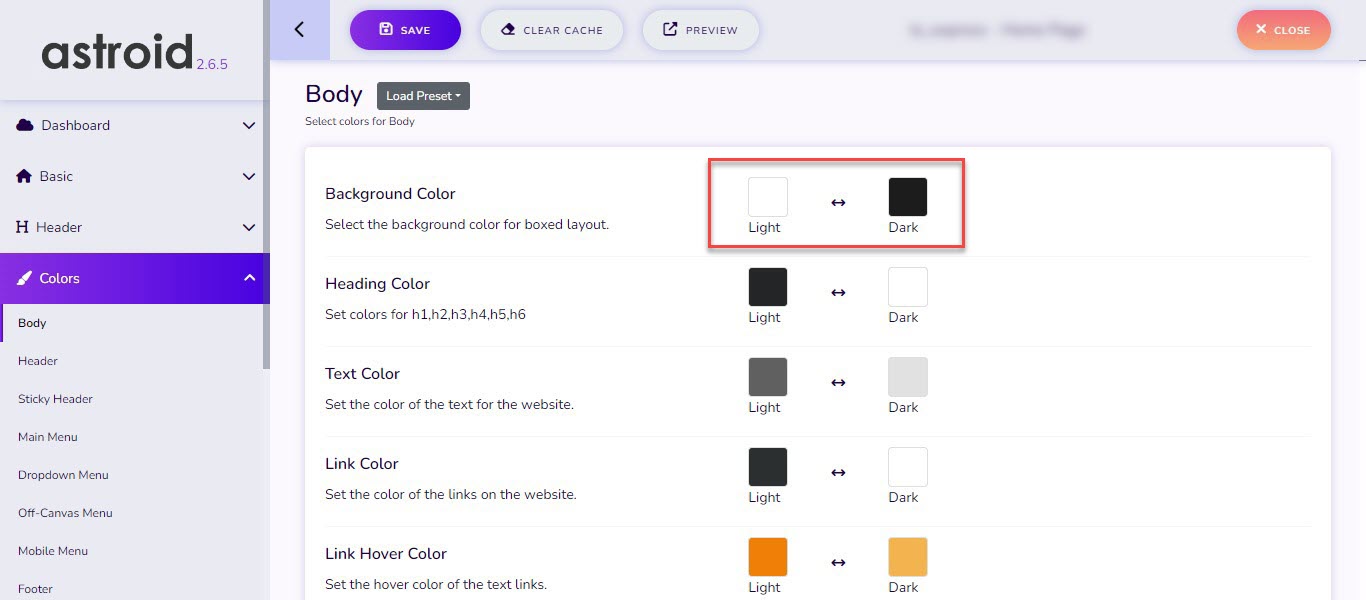
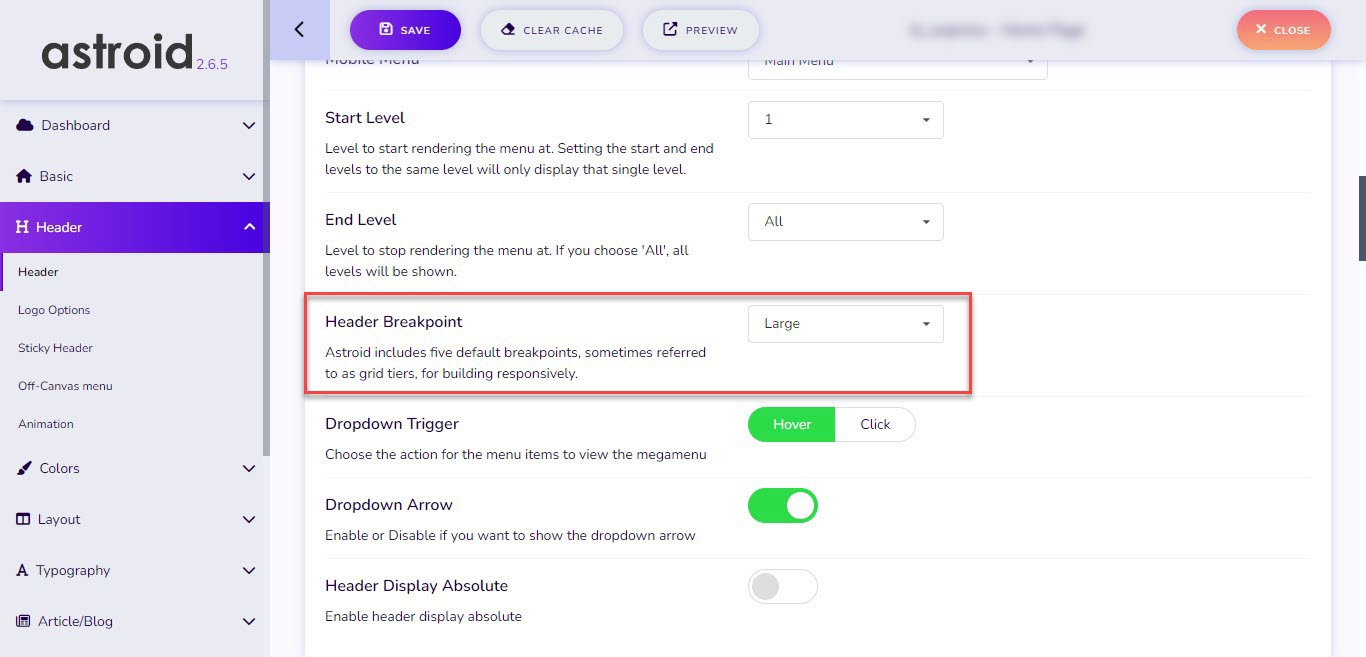
- Add feature Header Breakpoint
Breakpoints are the building blocks of responsive design. Use them to control when your layout can be adapted to a particular viewport or device size.
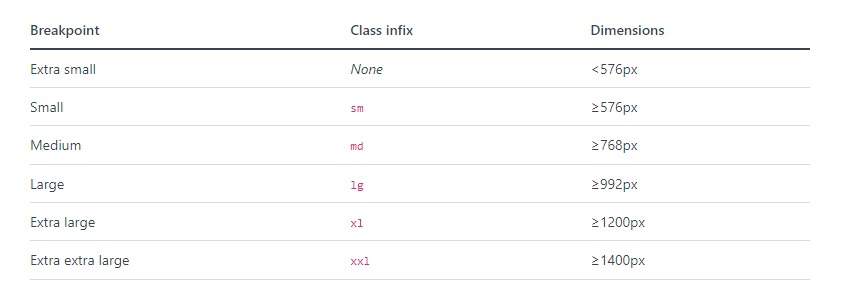
Astroid 2.6.5 offers users the breakpoint feature for the header and there are 5 main default breakpoints you can choose on the list including small, medium, large, extra large, and extra extra large.
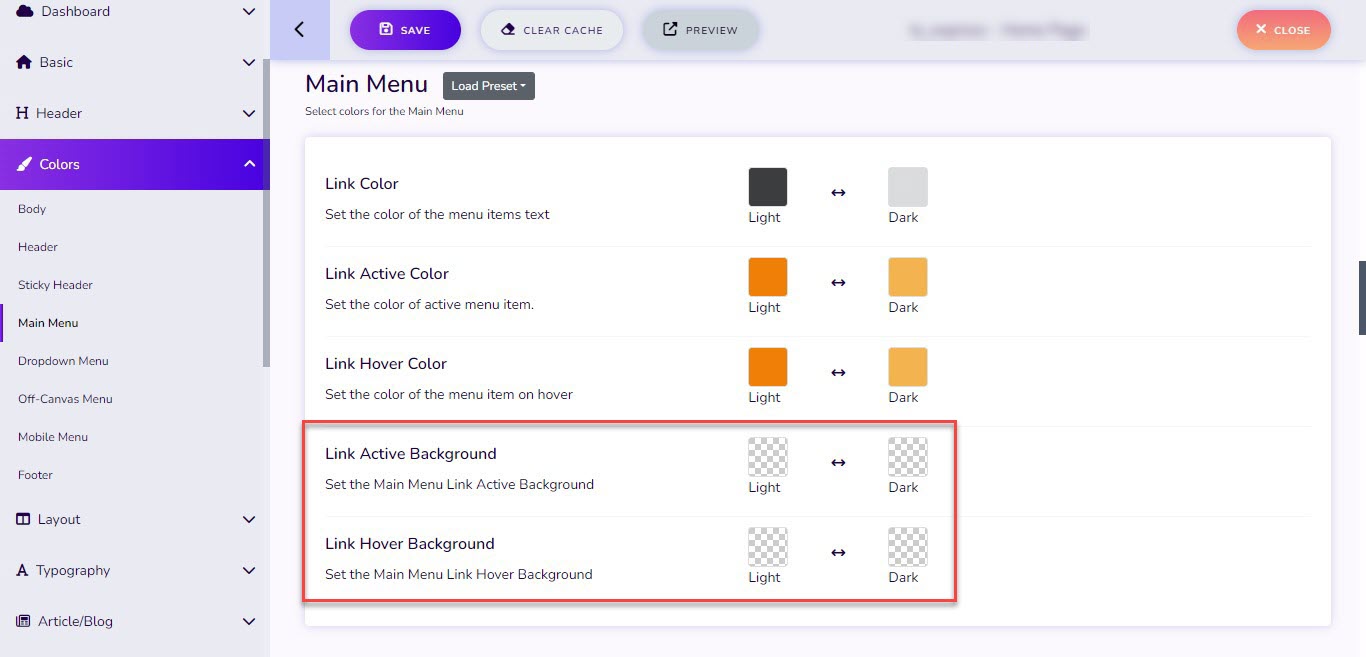
- Add an option to configure the background color of the Main Menu
When you update Astroid 2.6.5, you'll be able to change the background color of the main menu both in active or hover mode. Off course it also allows you to set different background colors for light and dark versions.
Besides those new features, this release also comes with a bunch of updates and improvements. Let's take a look at what's updated!
Updates
- Update Bootstrap 5.3.0-alpha3
- Update Astroid Cache Module language
- Update Copyright Info
- Update mobile button color for Sticky Header
- Update preloader style
- Update HTML background color
- Update Color Mode preset
Improvements
- Improve UX mobile menu heading
Fixed bug
- Fix issue load font from Local
We highly recommend users always keep the component up-to-date, in order to avoid unexpected problems. The update procedure is completely straightforward. You can update the component using the single-click updater in Joomla or download the latest package on Github, then install it manually. If you have any problem with the update, don't hesitate to contact us or post your issues HERE.
Download It On GitHub! Learn More Astroid Templates
- Details
- Category: Blog
Today I'm back with another important update of Astroid framework, coming with several fixes and improvements. Besides addressing well-known issues encountered in the prior version, we are also bringing you a new feature that might make your day.
Since Astroid version 2.6.4, you'll find a new block position 2 added to Horizontal Header. You're able to assign it to a module position, custom HTML or leave it blank. 
New
- Add block position 2 for Horizontal Header
Update
- Update Bootstrap 5.3.0
- Update FontAwesome 6.3.0
- Update Banner Link Target
- Update Astroid Language
- Update Copyright information
- Update Astroid Cache Module language
- Improve Stack Divided Style
Fixed bugs
- Fix issue Two (Sticky) headers
- [PHP8.2] Fix issue Deprecated: Creation of dynamic property
- Fix the issue MinifyCSS wrong file name
- Fix issue when line height is zero
- Fix the issue load Font Awesome from CDN when minify CSS
- Fix issue call language property when $menuItem is null
Download It On GitHub! Learn More Astroid Templates